

Factory reset: Did you know thatReturning your phone to its original settings can solve most technical issues? Using factory reset methods for theSamsung Galaxy A57 5G gives you the opportunity torestore performance quickly and eliminate temporary glitches or malicious apps. Tech experts recommend this process when users face device slowdowns or system issues. In this comprehensive guide, we will coverfactory reset methods through settings or recovery mode with ease and clear steps. We will also discuss the importance of factory reset, the expected benefits, and potential risks to be aware of. Discover how to benefit from a factory reset and enhance your data protection, with tips to boost your device’s security after the procedure, in line with the best technical expertise standards.
The importance of factory reset for Samsung Galaxy A57 5G
Factory reset: Have you ever thought about how effective this step is for your phone?
The “factory reset” process for the Samsung Galaxy A57 5G is a necessary step in many cases, especially when facing slow performance or system issues. Many users resort to resetting the device to its original state as an effective technique to restore phone speed and secure privacy when selling or giving it to someone else.
Steps for factory reset from settings
Factory reset is a common question among smartphone users. If you own a Samsung Galaxy A57 5G, following the factory reset steps from settings is important to restore device performance or remove personal data before selling. Here are the key steps:
1- Open “Settings” on your phone.

2- Go to “General Management” then choose “Reset”.
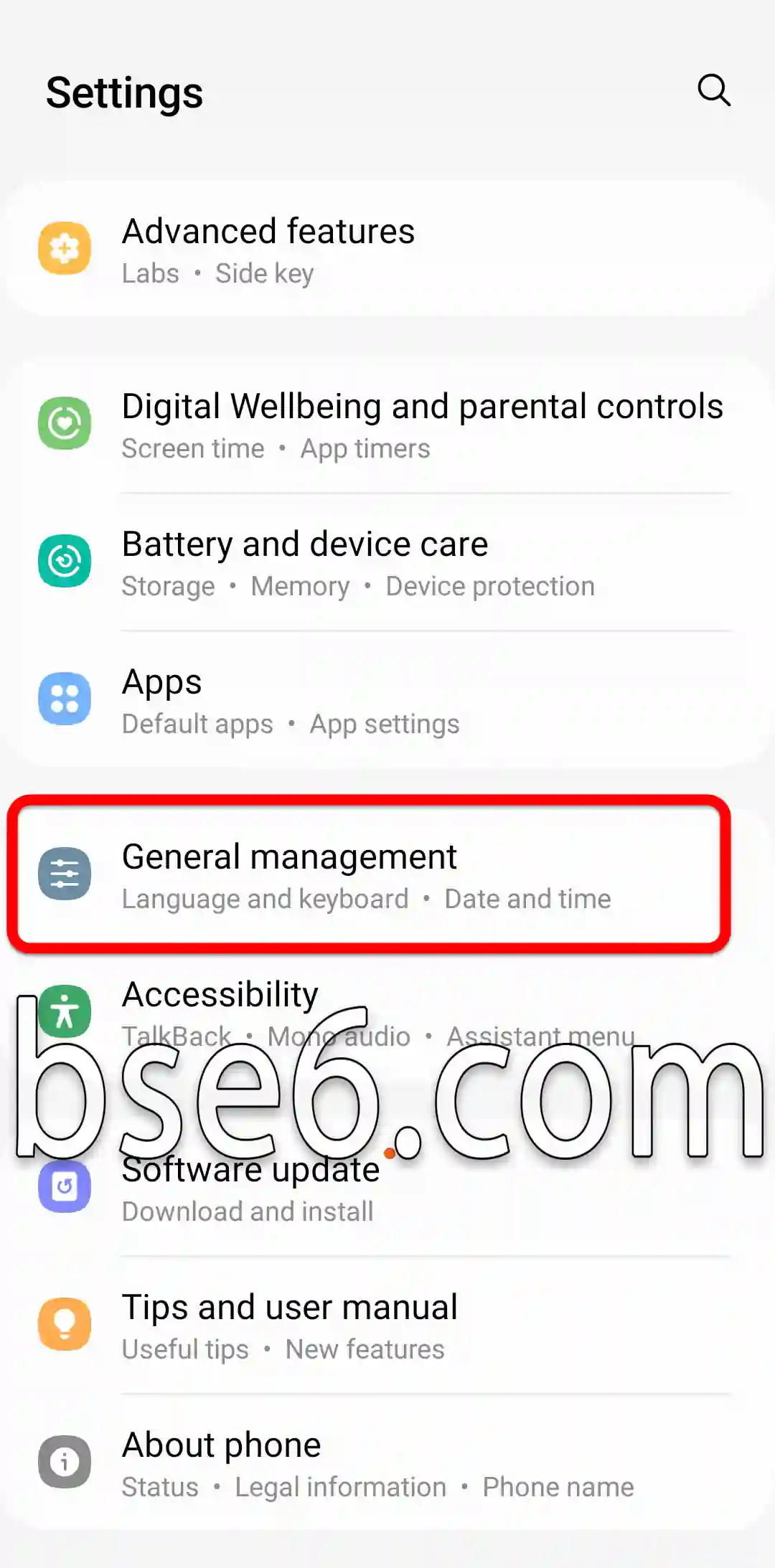
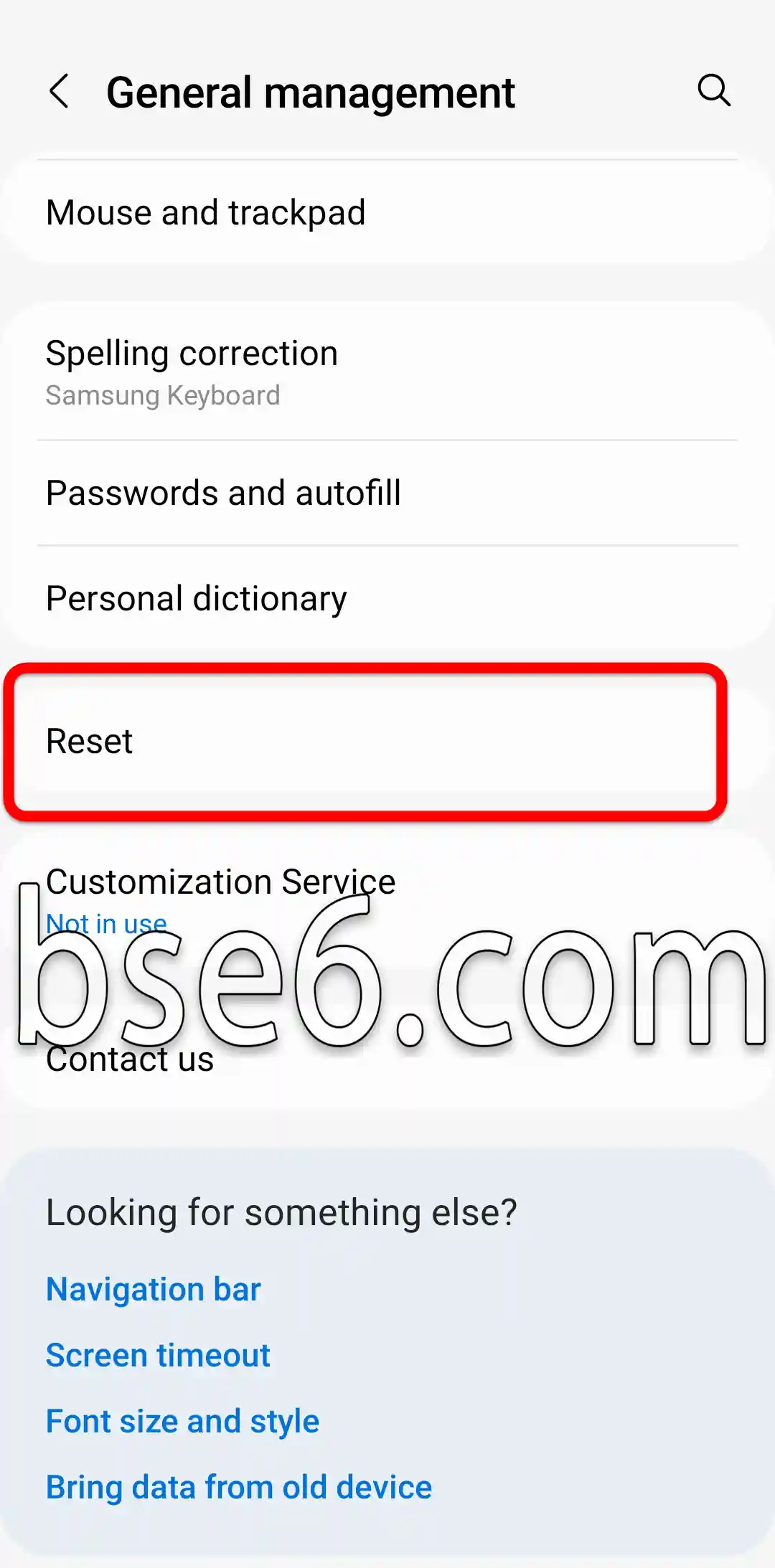
3- Tap “Factory data reset”.

4- Review the warnings, then choose “Reset” again.
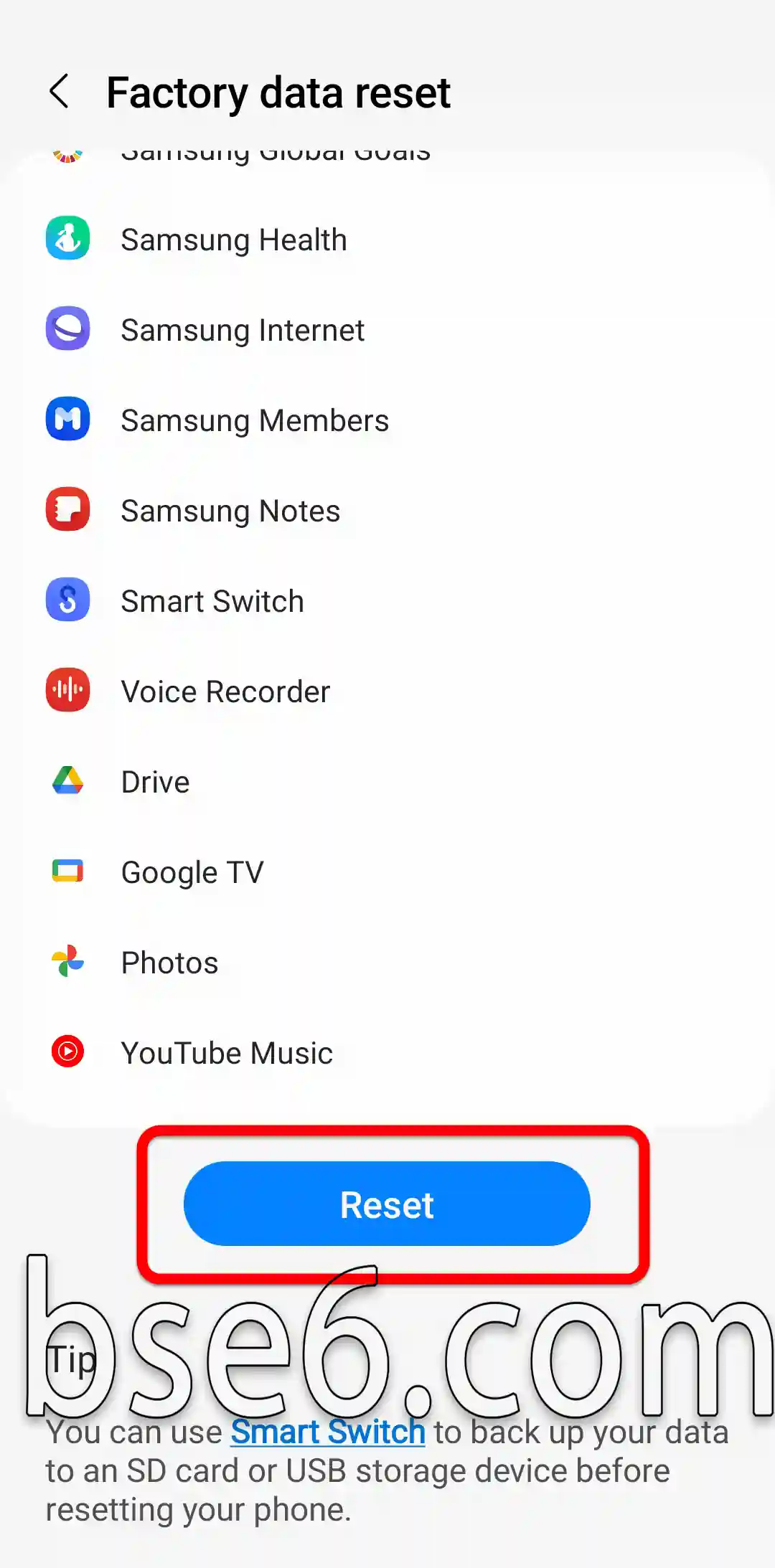
5- Enter the password to confirm and tap “Delete all” to start the process.

6- The phone will restart and remain on the Samsung Galaxy logo for a while, and after opening the phone, follow the instructions.
It is recommended to back up your data on a computer or through cloud services like OneDrive. This process enhances security and resolves technical issues, and experts recommend doing it only when necessary to maintain system stability.
Factory reset using phone buttons (recovery mode)
Factory reset: Are you facing recurring issues with your Samsung Galaxy A57 5G? Factory reset using phone buttons (recovery mode) represents an effective solution to restore the phone’s original performance.
Here are the practical steps:
1- Turn off the device completely (force shutdown by pressing power + volume down for a long press until the phone shuts down).

2- Press and hold the volume up button and the power button at the same time (some cases require connecting a USB cable to a computer or laptop).

3- Once the Samsung Galaxy logo appears, release all the buttons.
4- After opening the recovery page, use the volume buttons to navigate to “Wipe data/factory reset” and press the power button.
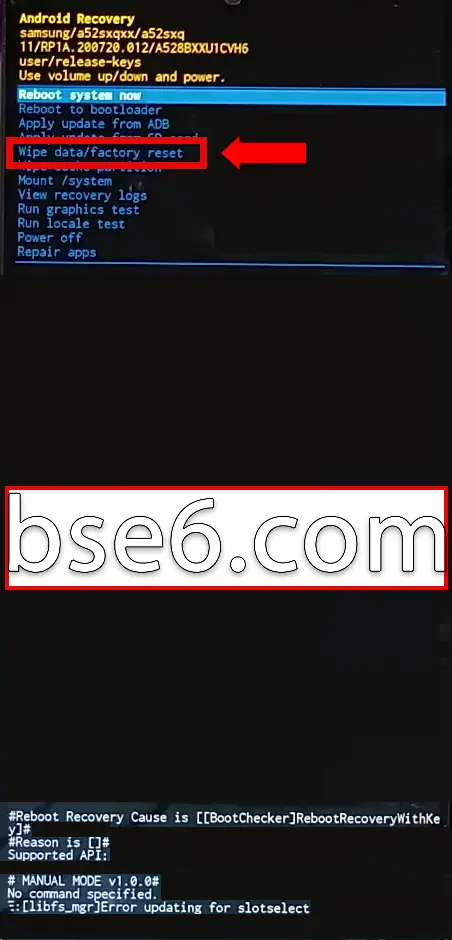
5- Scroll to “reset to settings” and press the power button.

6- Your phone will format and return to the main recovery page again.
7- Choose the first option “reboot system now” to restart the phone.

This solution addresses issues like freezing or slow system and safely returns the device to its original settings. If you use a computer or Android to store backups, easily restore your data afterward. It is recommended not to perform the process unless important data is backed up to ensure its safety. Specialists advise following tried steps to ensure the procedure’s effectiveness.
Why is factory reset important for the Galaxy A57 5G?
- Performance improvement: Over time, as applications and files accumulate, users may notice the phone slowing down. Factory reset removes all unnecessary data, helping to restore the device’s speed and efficiency.
- Resolving technical issues: When recurring issues like system freezing appear, reformatting is the ideal solution to overcome these malfunctions.
- Enhancing security: The reset process secures data protection by erasing all personal information, protecting the user from data leakage risks when selling or replacing the phone.
Tech experts from specialized sites, like the official Samsung site, recommend backing up important data before a factory reset. They also point out the importance of regularly updating the system to ensure the phone’s security and stability.
By following the correct instructions, users ensure a smooth experience, a clean device, and optimal performance for the Samsung Galaxy A57 5G.
When should you resort to a factory reset?
Factory reset: Has your Samsung Galaxy A57 5G become slow or experiencing recurring system issues? Sometimes, a factory reset becomes a necessary option to restore original performance and resolve technical malfunctions.
We recommend resorting to a reset in the following cases:
- Applications continue to stop unexpectedly despite being updated.
- Problems appear in receiving calls or sending messages.
- Internal memory fills up without a clear reason.
- Difficulty removing malicious software or viruses.
Performing a factory reset is similar in effect to using the Android system to restore the computer to its basic settings. This returns the device to its original state and addresses most malfunctions. Always ensure to back up your data before resetting, as all personal information will be automatically deleted. Official technical support sites recommend this step when traditional solutions fail.
User experience: Restoring phone performance after severe slowdown
Factory reset: Have you noticed a severe slowdown in your smartphone recently? Many users face a decline in their device’s performance over time. Restoring the phone’s original performance often requires performing a factory reset, especially when app usage increases or temporary memory fills up.
By resetting the device, unnecessary files and apps are deleted, giving the phone a chance to return to its ideal state. Samsung Galaxy A57 5G users have confirmed the effectiveness of this step in improving system speed.
For best results:
- Make sure to back up your important data before resetting.
- Follow the steps to reset the operating system carefully to achieve maximum benefit.
- Continue updating the system after reformatting to enhance protection and performance.
Potential risks and benefits of factory reset
Factory reset: Have you ever wondered about the impact of this step on your data and device performance?
Factory reset returns the device to its original settings and is often used to solve performance issues or delete all data. Its main benefits include:
- Getting rid of harmful files and apps.
- Speeding up mobile or computer performance.
- Solving frequent freezing or slow issues.
- Preparing the device for sale safely.
Potential risks include losing all personal data, such as photos and contacts, if backups are not made. System updates and all installed apps may also be lost after resetting. Experts advise ensuring important files are transferred before starting the process. Global tech sources emphasize the importance of accurately understanding factory reset steps to ensure maximum benefit safely.
Easy factory reset methods for Samsung Galaxy A57 5G
Factory reset: Did you know that performing a factory reset can return your Samsung Galaxy A57 5G to its original state and solve most system problems? Correct steps are essential to preserve your data and ensure optimal device performance recovery. Here is a detailed guide on easy and effective factory reset methods for the Galaxy A57 5G:
First: The importance of factory reset
- Returning device settings to default
- Fixing software and network issues
- Improving system speed and responsiveness
- Protection when selling or replacing the phone
Factory reset methods for Samsung Galaxy A57 5G:
- Reset through settings:
- Go to “Settings”.
- Choose “General Management”.
- Tap “Reset” then “Factory data reset”.
- Follow the instructions.
- Reset using recovery mode:
- Turn off the phone completely.
- Press and hold the volume up and power buttons until the Samsung logo appears.
- Choose “wipe data/factory reset” using the volume buttons to navigate and the power button to confirm.
- Restart the device after finishing.
Important points before factory reset:
- Back up important data
- Remove your accounts to protect information
By applying these methods, you will easily restore your phone. For more professionalism, tech experts and trusted sources like Samsung’s technical support recommend following the steps carefully.
Important tips before and after relying on factory reset
Factory reset may be the key to solving many smart device issues like the Samsung Galaxy A57 5G. What are the most important tips to follow before and after performing this step to protect your data and device from any unexpected losses?
Tips before relying on factory reset
- Data backup: Always make sure to back up photos, contacts, and important documents on a computer or cloud storage.
- Removing email and app accounts: Log out of your Google account and any essential apps to avoid verification issues after the reset.
- Fully charge the device: Ensure your phone is charged to at least 80% before starting the process to avoid sudden interruptions.
- Installing system updates: It is recommended to update Android or any backup software that may assist you during data recovery via computer.
Tips after relying on factory reset
- Restoring the backup: Reload your data from previously stored backups.
- Device check: Verify system integrity and performance stability; any malfunction may indicate a technical issue requiring inspection.
- Installing apps from a safe source: Ensure to download your apps only from a trusted store.
- Changing passwords: This step is important to enhance digital security after removing all data.
By following these tips, you ensure the security and smoothness of the factory reset experience for the Samsung Galaxy A57 5G and reduce the likelihood of losing your important data, based on best technical practices.
Data recovery and preserving important files
Factory reset may expose your important data to risk if appropriate backup measures are not taken. It is always recommended to recover data before performing any reset. This is necessary to ensure no loss of photos, documents, or important files.
To preserve your files:
- Use cloud storage services like Google Drive or OneDrive.
- Regularly back up critical files.
- If you wish to perform a factory reset for the Samsung Galaxy A57 5G, ensure the data saving process is complete.
- Do not overlook modern technologies that enable data recovery when needed.
Technical experts point out that prevention is better than cure when dealing with valuable personal or professional data.
Tech experts’ tips after factory reset
Factory reset may seem like a simple step, but it represents a turning point in the performance of electronic devices like phones and computers. Tech experts advise following some steps after completing any device reset to ensure system stability and data protection:
- Ensure all apps and programs are updated from official sources.
- Use effective protection software to scan the device after the reset.
- Restore your data from the backup and verify its integrity.
- Set up privacy as needed and update your passwords.
- To maintain phone performance, it is recommended to try restarting after installing updates.
Following these tips removes doubts about the return of previous problems and protects your device from security threats, according to recommendations from global tech sites and official support centers.
What is the difference between factory reset and regular restart?
Factory reset: Have you ever wondered about the difference between a factory reset and a regular restart for your smartphone or computer? Factory reset means returning the system to its original state as it came from the factory, where all data, files, and personal settings are deleted. It is often used when there are major system errors or the desire to sell the device.
On the other hand, a regular restart reloads the operating system quickly, without deleting data or losing files, and helps solve temporary issues or slow performance. Experts recommend resorting to a factory reset only when absolutely necessary, while a restart is an ideal solution for most Android or Samsung device problems. Always remember to back up before any reset to ensure your data’s safety.
Does factory reset affect system updates?
Factory reset: Have you ever wondered if it affects system updates on your phone?
Factory reset returns devices to their original state at purchase, removing all data and apps. For Samsung Galaxy A57 5G phones, a reset does not affect previously installed system updates; the Android version or updated system interface remains the same.
Benefits of reset include:
- Solving performance issues.
- Removing viruses and harmful software.
- Speeding up the device and improving its efficiency.
Trusted tech sources always recommend backing up before a factory reset. The system remains updated after the reset, giving you a clean device and better performance without losing essential updates.
How do I protect my data before performing a factory reset?
Factory reset may seem like a necessary step when facing performance issues or wanting to sell the device, but how do I protect my data before a factory reset? To protect important information, experts recommend following several essential procedures before starting the factory reset process:
- Backup: Use the cloud backup feature on your phone or trusted external apps to transfer photos, videos, messages, and contacts.
- Ensuring password storage: Make sure to store login data for your Google accounts securely.
- Reviewing important files: Transfer important documents and files to a computer or cloud storage service.
- Previewing apps: Ensure to sync data from apps containing sensitive information.
Following these steps ensures your data’s protection and gives you peace of mind before performing a factory reset on the device.
Factory reset is an essential step to restore the performance of the Samsung Galaxy A57 5G when facing issues or device slowdown. We learned about the importance of returning the device to its original state, its benefits like error correction and data protection, as well as potential risks like data loss. Use phone buttons (recovery mode) to easily reset the device if you forget the code or cannot access it. Tech experts recommend backing up data before starting and ensuring the phone is well-charged. If you found the guide helpful, try the steps and share your experience in the comments, or read our article on “Best Ways to Transfer Data After Factory Reset for Samsung Phones”.