
How to Easily Control System Vibration on the Samsung Galaxy A57 5G
System Vibration: Have you ever noticed an unexpected vibration in your Samsung Galaxy A57 5G while using it? Many users face this problem, especially while scrolling the screen or receiving notifications. Understanding system vibration is an important step in ensuring your phone is comfortable to use and easy to handle. This article will explain the causes of system vibration and the most practical steps to control it without affecting the user experience or missing important notifications. Keep reading to learn about a user’s story of solving the problem once and for all, and see how adjusting system vibration affects notifications and screen quality.
Understanding System Vibration on Samsung Galaxy A57 5G
System vibration on smartphones like the Samsung Galaxy A57 5G can be an essential feature for some people and a source of annoyance for others. Have you ever wondered how to control system vibration or why a problem might occur in this area?
System vibration is part of the phone’s settings, and its main purpose is to alert the user to notifications and calls without requiring loud sound. In many cases, a problem may appear, such as weak vibration or vibration stopping completely, which can affect your phone use experience.
To control system vibration on Samsung Galaxy A57 5G, follow these simple steps:
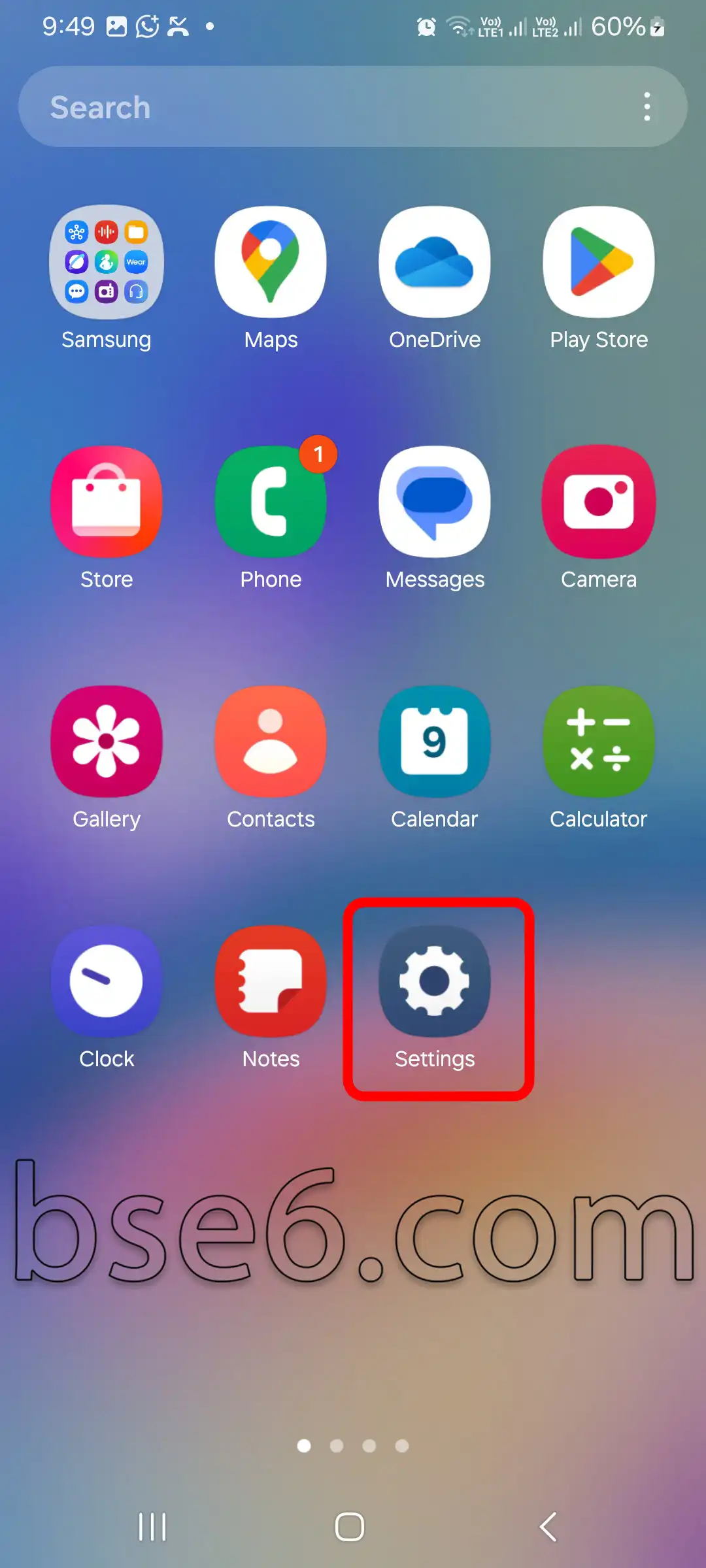
1- Open the “Settings” app on your phone.
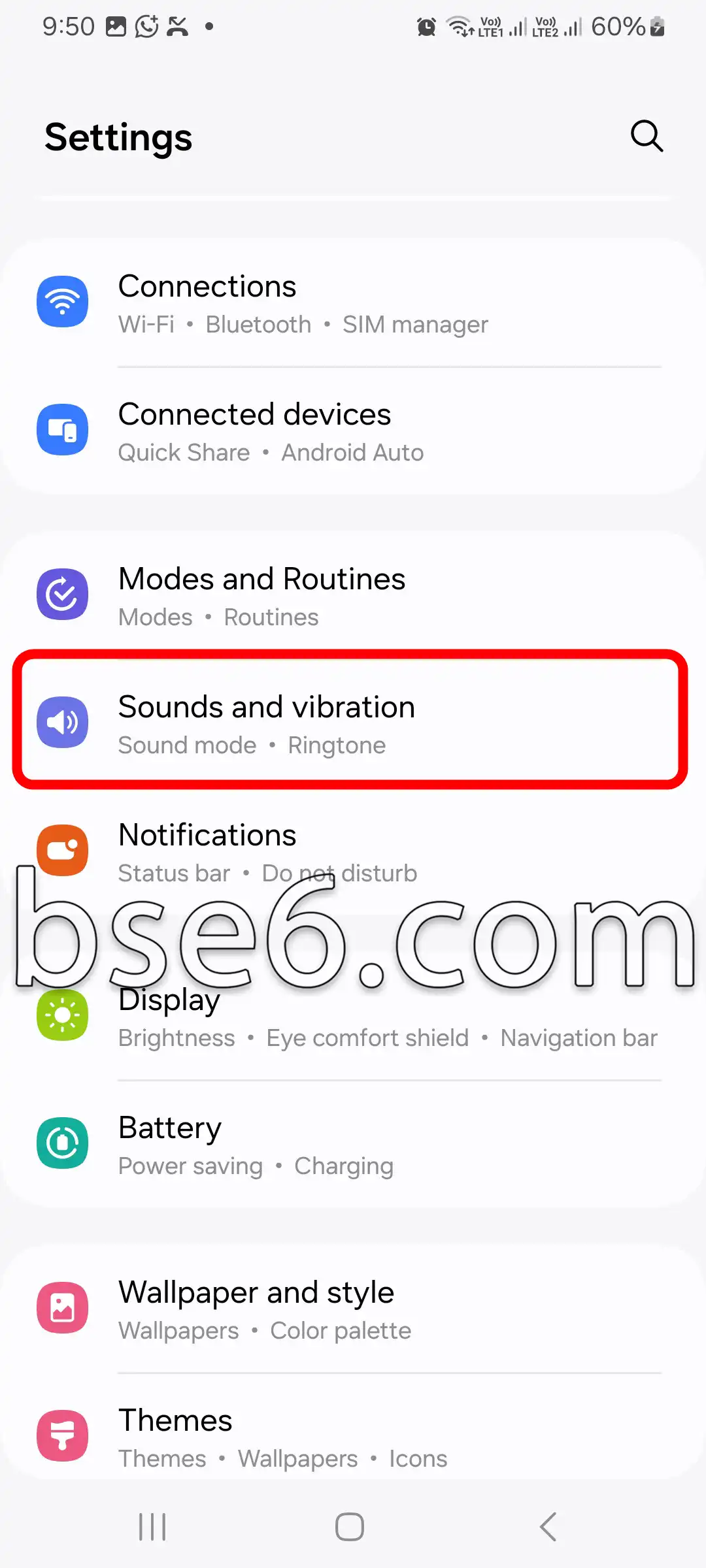
2- Go to the “Sounds and vibration” section.
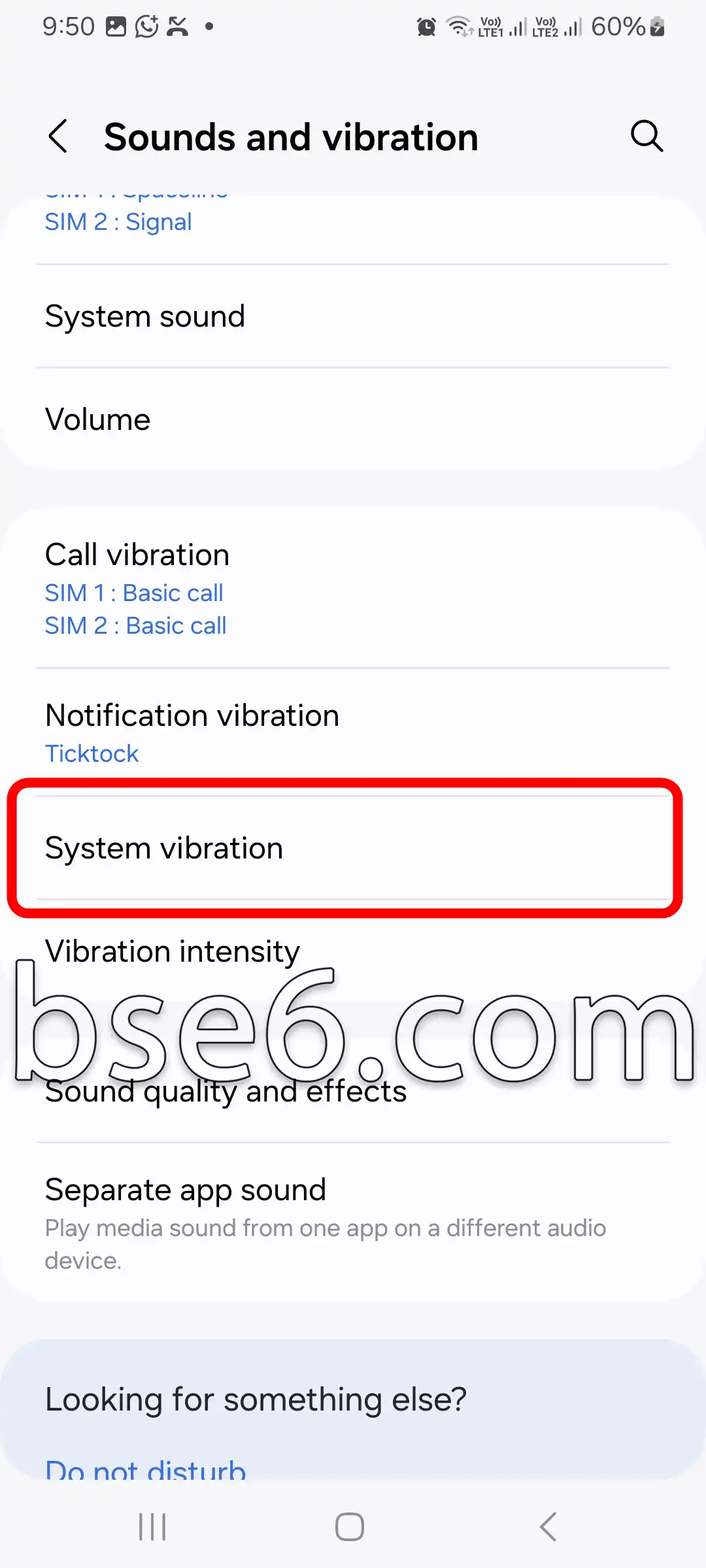
3- Go to “System vibration.”
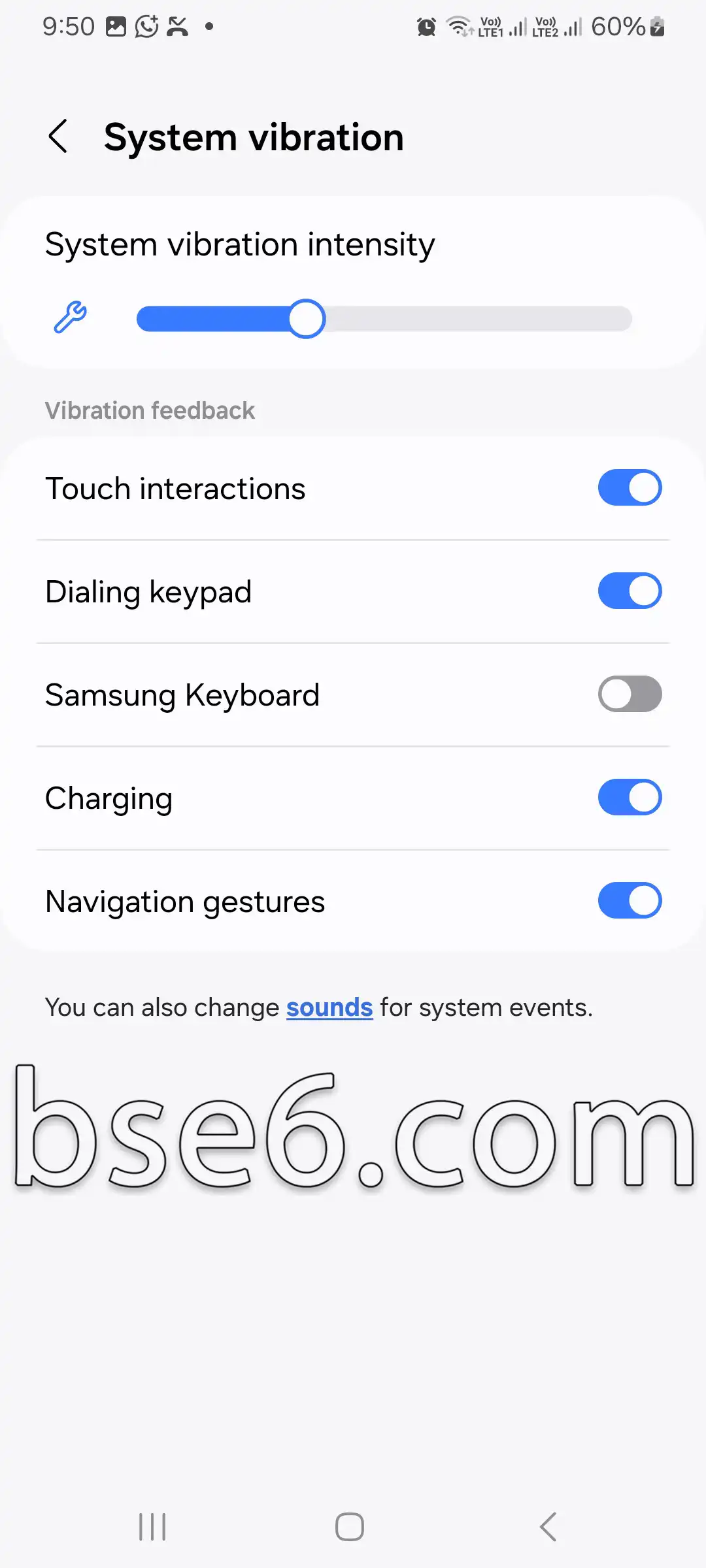
4- Here you’ll find custom options to control the intensity and pattern of vibration when notifications or calls are received. You can turn vibration on or off as needed.
If the vibration issue persists, make sure the device software is up to date or restart the device.
These steps are often enough to solve most minor system vibration issues. It is worth noting that Samsung phones feature advanced settings that let users fine-tune the vibration experience. If the problem is not resolved using the steps above, it is recommended to seek help from official support or trusted official sources.
Controlling system vibration effectively ensures a smoother, more comfortable experience, while reducing annoyance or the chance of missing important notifications.
The importance of daily system vibration settings
System vibration plays a key role in the phone experience, especially on devices like the Samsung Galaxy A57 5G. Configuring system vibration for everyday use improves comfort and precision when receiving notifications. Simple steps involve going into Settings, then the Sound menu, and selecting the System vibration option. Smart control of vibration intensity helps save battery and lets you customize the phone’s responses for specific situations.
You can also adjust keyboard vibration to give you tactile feedback while typing, which increases typing speed and accuracy. Tech experts recommend updating vibration settings regularly to improve performance, depending on your preferences and the environment you use it in. That way, you get a more complete experience and make the most of the device’s capabilities.
Common reasons for system vibration appearing unexpectedly
System vibration: Have you noticed sudden vibrations on your phone? This phenomenon is common among Samsung users, especially on the Galaxy A57 5G. The cause may be recent system updates that change vibration mode settings, or incorrect configuration of notification and app settings. Sometimes, installing third-party apps to control screen vibration can cause unexpected issues.
It is important to regularly review the phone’s settings, check the systems used to control vibration, and make sure the software is properly updated from trusted Samsung sources. Experts recommend installing vibration management apps only from an official store. This helps maintain a stable experience and enjoy everyday use without irritation.
The Impact of System Vibration on the Phone Experience
System vibration: Have you noticed how a smartphone’s vibration affects your daily experience?
The system vibration feature is an essential function in phones such as the Samsung Galaxy A57 5G, as it helps alert the user to notifications and calls. The problem arises when the vibration becomes too strong or constant, which negatively affects battery life and becomes distracting.
In practical terms, excessive system vibration can lead to higher power consumption and may cause annoyance during meetings or study sessions. Tech experts recommend learning how to control this feature and adjusting it according to daily use.
To get the best results:
- Review the vibration off or adjustment settings according to your needs.
- Make use of the user guide.
- Monitor the impact of vibration on battery life.
A balanced use of this feature ensures a comfortable and efficient experience.
Easy steps to control system vibration
System vibration: Did you know that being able to control system vibration on your Samsung Galaxy A57 5G directly affects your comfort and everyday experience?
Phone vibrations are an essential part of the user experience, as they silently alert you to calls and notifications. However, managing them can be necessary to save battery life or during meetings and formal occasions.
Here are a few simple steps to help you adjust system vibration on the Samsung Galaxy A57 5G:
- Open “Settings” from the Home screen.
- Scroll to “Sounds and vibration,” then tap it.
- You will find several options such as “Vibration mode” and “Vibration intensity.”
- Use the controls to adjust vibration strength or turn it off as needed.
- You can also enable vibration for notifications only or calls only, depending on your preferences.
These steps are available on most modern Samsung phones, and they feature a simple interface that ensures a smooth, reliable experience. Samsung technical support reports indicate that improving vibration management can reduce power consumption by up to 8%.
In practical terms, users prefer to adjust settings to match their lifestyle. For example, some may choose to turn off vibration during meetings or while studying, or make it stronger in crowded places.
Customizing vibration settings gives you full control over the phone experience and helps avoid unwanted distractions. For best performance, tech experts recommend checking these settings regularly, especially after system updates.
Adjusting system vibration from the Settings menu
System vibration is an important feature for smartphone users, so how can you adjust system vibration from the Settings menu on your Samsung Galaxy A57 5G? Many people rely on vibration to receive alerts without having to keep looking at the screen.
To change vibration settings, go to “Settings,” then select “Sounds and vibration.” From there, you can control how strongly the phone vibrates when calls or notifications come in, or when you tap the keyboard. You can also customize a separate vibration pattern for each function.
Adjusting vibration helps you solve the problem of missed notifications, making everyday use more comfortable and professional. For the most accurate and reliable steps, it is best to refer to Samsung’s official guide.
Sharing a user story about solving a vibration issue
System vibration is a problem many smartphone users face, especially on devices like the Samsung Galaxy A57 5G. Ahmed, a user of this phone, noticed that vibration was occurring outside the usual notification times, which caused him repeated annoyance.
Ahmed searched for a solution and found information about the vibration settings in the Quick Settings panel. He went to Settings > Sounds and vibration > Vibration, then turned off vibration for unnecessary alerts and calls. After applying these steps, Ahmed noticed a significant improvement in the user experience.
By consulting Samsung’s official forums and reviewing trusted sources, Ahmed was able to solve the problem effectively. His advice: review your device settings regularly and make sure the system is up to date. These steps help prevent similar issues and are the best solution for unwanted vibration.
How can you completely turn off system vibration on the Samsung Galaxy A57 5G?
System vibration on the Samsung Galaxy A57 5G can sometimes be annoying. You can turn it off completely by following these steps:
- Open “Settings” from the Home screen.
- Select “Sounds and vibration.”
- Turn off “Vibrate while ringing” and “Vibrate in silent mode” with ease.
- Check the vibration settings in Android when connecting the phone to a computer.
- This gives you full control over system vibration without affecting important notifications.
These solutions provide a quieter, more comfortable experience, while also helping you stay focused and extend battery life. If the problem persists, it is recommended to consult the user manual or an authorized Samsung service center to ensure expert, accurate support.
Does changing system vibration affect notifications?
System vibration: Did you know that adjusting system vibration on the Samsung Galaxy A57 5G can affect the notification experience? The problem appears when the vibration strength or pattern changes, which may make on-screen alerts less noticeable. For alerts to remain effective, it is best to fine-tune vibration settings in Settings. Suggested solutions include adjusting the options without disabling notifications entirely, which helps improve your phone’s responsiveness and alert you to important events.
What should you do if the system vibration keeps going after changing the settings?|
System vibration can sometimes continue even after you change the settings on Samsung Galaxy A57 5G, so what is the ideal solution? It is recommended to follow simple steps, such as restarting the device and updating the software. If the problem persists, you can try resetting the Settings app or contacting Samsung Support. These solutions are often effective and help restore the phone’s normal performance, according to expert recommendations and official Samsung sources.
System vibration: Are you looking for a solution to the problem of unexpected vibration on your device? Understanding system vibration on Samsung Galaxy A57 5G gives you better control and more comfort while using the screen. With simple steps such as adjusting the switches in Settings, you can reduce vibration issues easily without needing third-party software or Android. One user’s experience confirms how effective these methods are in restoring device stability. Try these solutions today and share your opinion or question in the comments!